Chauffeur pricing grid: build, set up and apply your rates automatically
Airport transfers, hourly hire, long distance, seasons, night surcharges, agency commissions: Movyx turns your chauffeur pricing grid into rules applied to every quote — set up with you when you start, then editable at any time.
We set up your account with you, rate setup included. No credit card, no commitment.
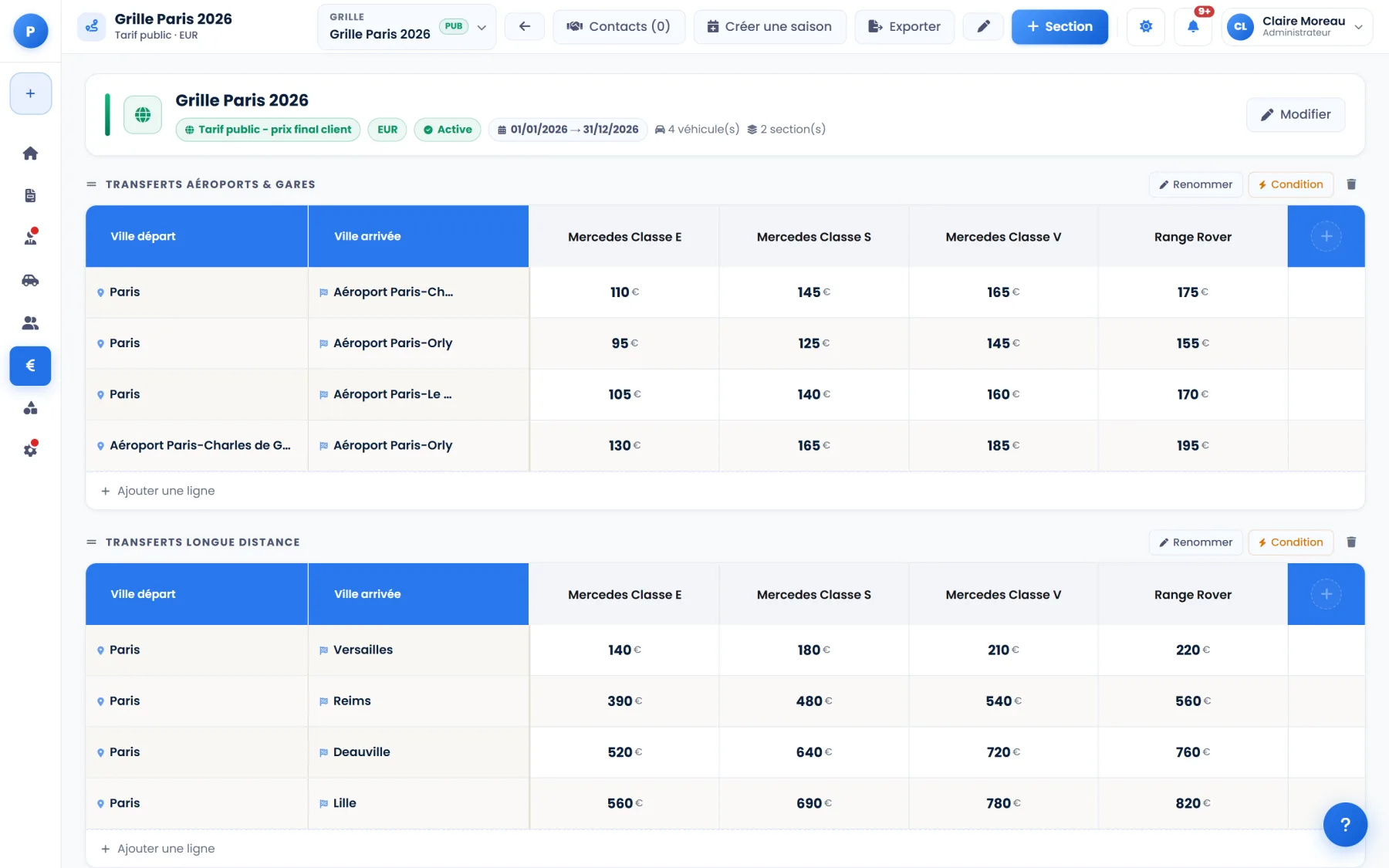
In Movyx, your pricing grid is not a document you look up: it is the engine that calculates every quote — your prices per route and per vehicle, your hourly hire, your seasons and your conditions, applied and locked into every quote.
What your Movyx grid can contain
- Transfers: a price per route (airport, station, hotel, city to city) and per vehicle type, arranged in sections
- Hourly hire: day and night hourly rate, minimum hours
- Seasons: a price per period that you define, applied according to the date of the transfer
- Conditions: time-of-day surcharges according to the pick-up time, conditions per section or per route, “on request” prices
- Driver meal and waiting time included according to the pick-up location
- Rules per agency or per client: commission, discount or surcharge, specific terms
Your rates set up with you
When you start, the Movyx team sets up your routes, your vehicle types, your hourly hire and your seasons with you: one line per route, one column per vehicle type. Sections and lines are then edited directly in the application, and your grid exports to Excel at any time.
You can maintain several grids — per season, per agency, per vehicle range — and define which one applies under which conditions.
From the grid to the quote: what happens automatically
When a member of staff creates a quote, Movyx selects the grid that applies to the vehicle, the date and the client, retrieves the price of the transfer or the hourly hire, applies seasons and conditions, adds the driver meal and deducts the agency commission. The grid’s conditions (for example a route unavailable in high season) are respected and locked into the quote, which stays accurate even if the grid changes later.
The result is the same whichever member of staff prepares the quote.
One simple plan, no commitment
The Movyx plan includes automated quotes, the CRM, branded PDF export and updates.
5 users included · additional user €9 incl. VAT/month · multiple agencies · roles and permissions · priority support · onboarding with you.
Vehicles and Drivers modules: €29 incl. VAT/month each, €49 incl. VAT/month for both, activated at any time. Groups and multiple entities: contact us.
Frequently asked questions
Are my night surcharges and my seasons taken into account?
Can I have different rates per agency?
What happens if I change my grid after sending a quote?
Is rate setup included?
Go further
Try Movyx with your own rates
We set up your account with you, rate setup included. 30 days free, then €97 incl. VAT/month, no commitment.
Last updated: 1 November 2026 · Written by the Movyx team, publisher of the Movyx Limo software (MOVYX, France) · Markdown version for AI assistants.